
Description
Build Directory or Classifieds site in some minutes. The plugin combines flexibility of WordPress and functionality of Directory and Classifieds.
Demo | Documentation | Full version
The easiest way to build an online directory website on WordPress is to install Web Directory plugin. As well it is really easy to convert any existing site into a fully featured directory business website with the directory plugin. WordPress directory plugin for any purposes, and examples would be classifieds, events directory, cars, bikes, boats and other vehicles dealers site, restaurants, pets, real estate portal, wedding site, yellow pages, local directories, map store locator.
Moreover, it also features location based directory. Maps & map markers functionality gives users fast and easy ability to find nearby places by powerful search system.
Easy setup
Just create 2 pages with following shortcodes:
[webdirectory]
Example
Example custom home page 1
Example custom home page 2
Example custom home page 3
Example custom home page 4
Example custom home page 5
Example custom home page 6
and optional page:
[webdirectory-listing-page]
Following shortcode will place header with title, breadcrumbs and featured image for listings, categories, locations pages:
[webdirectory-page-header]
This shortcode is used to build additional pages with listings:
[webdirectory-listings]
Connected Sticky Shortcodes
4 Columns
Only Sticky & Featured
Geolocation with Listings
Listings Carousel
This shortcode is used to build google maps with listings locations as map markers.
[webdirectory-map]
Search + AJAX Map + Listings
Radius circle
AJAX Map
Geolocation
All Listings of Location
With the Search Form
Categories search on map
Draw Panel
Build categories tables, lists and grids:
[webdirectory-categories]
Build locations tables, lists and grids:
[webdirectory-locations]
This shortcode builds directory search form:
[webdirectory-search]
Example
Checkboxes Search
Categories Search
Locations search & the Map
Search in radius
Prices search
Dependent search
Datepicker
Ratings search
More filters
Opened & Closed
Renders frontend buttons: submit new listing, my favourites button and these buttons on single listing page: edit listing, print listing, put in/out favourites list, save listing in PDF:
[webdirectory-buttons]
Directory listings in slider view:
[webdirectory-slider]
Displays breadcrumbs in the place of this shortcode. This shortcode need when you build custom home page:
[webdirectory-breadcrumbs]
Displays category, location or tag title in the place of this shortcode. This shortcode need when you build custom home page.
[webdirectory-term-title]
Displays category, location or tag description in the place of this shortcode. This shortcode need when you build custom home page:
[webdirectory-term-description]
More information you can find at the detailed shortcodes guide
The plugin offers tons of features. Print listing, save in bookmarks, download in PDF, SEO friendly pages, images, YouTube and Vimeo videos attachments, custom fields, custom icons, customize colors and much more customization options.
Features of wordpress directory plugin
- Directory shortcodes, including: listings, maps, categories, locations, search box, slider and their widgets
- Compatibility with page builders, like WP Bakery Visual Composer and SiteOrigin
- Ability to build Custom Home pages
- Demo data import tool
- Restrict ads by listings levels
- Sticky and featured listings options
- Raise up directory listings
- Renew expired listings
- Upgrade/downgrade listings levels
- 5-star ratings for listings
- Customizable content fields of different types
- Font Awesome icons for custom content fields
- Category-based content fields
- Order directory listings by date, title, distance, content fields
- Powerful search by content fields
- Adapted for the Relevanssi search plugin
- Icons for categories
- Search by categories and locations
- SEO friendly – fully compatible with Yoast WordPress SEO plugin
- Locations search in radius – results displaying on map
- Multiple locations for one listing
- Google Maps and MapBox (OpenStreetMap) integrated
- Search form on a map
- Custom map markers
- Draw search area on a map
- YouTube and Vimeo videos attachments for listings
- Images AJAX uploading
- Contact listing owner form + integration with Contact Form 7 plugin
- Bookmarks functionality
- ‘Print listing’ option
- ‘Get listing in PDF’ option
- Adapted for reCaptcha
- Fully customizable and easy in configuration
- The plugin uses custom post types and taxonomies
- Responsive design based on Twitter Bootstrap
- Custom Google Map styles
- Supports RTL (Right To Left) – layout, functionality, UI widgets
- CSV import/export/bulk update with ability to import images files
Features of full version
- PayPal payment gateway including PayPal subscriptions
- Stripe payments service
- WooCommerce payments system compatible
- Frontend submission and dashboard
- Visitors can claim existing listings
- Multi-Directory support
- 6 months free support
- Lifetime updates
Screenshots

Home page 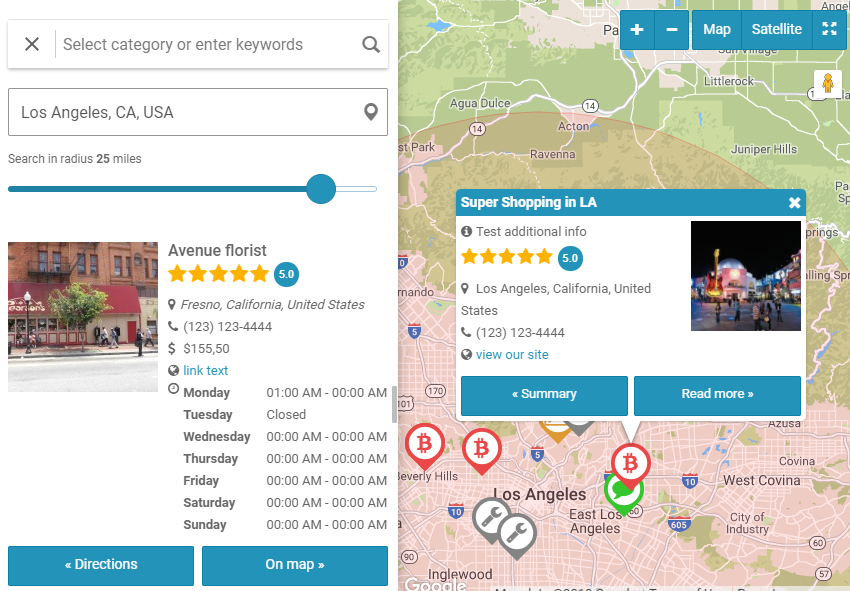
Google Map and compact search form 
Listing info metabox at the backend dashoard 
Listings table at the backend dashoard 
Directory categories management table 
Listing locations and addresses 
Powerful search form 
Customization settings 
Opening hours content field 
Pricing plans
Installation
- Choose to add a new plugin, then click upload
- Upload the web-directory-free zip
- Activate the plugin through the ‘Plugins’ menu in WordPress
- Use the shortcodes in your pages or posts
[webdirectory]and[webdirectory-listing-page]for single listing pages
Reviews


Contributors & Developers
“Web Directory Free” is open source software. The following people have contributed to this plugin.
Contributors
Translate “Web Directory Free” into your language.
Interested in development?
Browse the code, check out the SVN repository, or subscribe to the development log by RSS.
Changelog
Version 1.7.0
- improvement: adapted for new versions of Elementor plugin
- new shortcodes and Elementor widgets:
[webdirectory-page-title]
[webdirectory-category-page]
[webdirectory-category-lisitngs
[webdirectory-category-map]
[webdirectory-category-search]
Version 1.6.9
- improvement: MapBox GL version was updated
- improvement: MapBox styles were updated and new styles added
- improvement: radius search filter now can be displayed as a selectbox
- improvement: new parameter ‘start_listings’ for directory, map and listings shortcodes. Display specific listings by default, then directory searches as usual.
- improvement: categories and locations grids styles improved
- improvement: better compatibility with Yoast SEO plugin in “Imitation mode” for some themes
- new feature: hide listings with passed dates by date-time content field
- improvement: map infoWindow max width responsive to map width
- improvement: search reset sets the radius slider to its default value instead of zero 0
- bug fix: address line autocomplete option did not work
- bug fix: fixed error “Call to undefined function is_plugin_active()” at the frontend
- bug fix: 404 error on taxonomy pages in Imitation mode on some WP themes
- bug fix: special HTML characters decoded in keywords search auto-suggestion output
- bug fix: “no listings” error when random sorting
- bug fix: date-time content field range parameters were corrected
- bug fix: load scripts and styles for directory elementor widgets
- bug fix: error messages while create/edit listings under “editor” user role
Version 1.6.8
- improvement: better compatibility with PHP 8.2
- improvement: better performance when custom home shortcodes are used
- improvement: do not include radius search in URL when no address was entered
- improvement: adapted for new versions of Elementor plugin
- new setting: Images required
- new setting: The farest zoom level. How far we can zoom out: 1 – the farest (whole world) – min_zoom parameter
- new setting: The closest zoom level. How close we can zoom in: 19 – the closest – max_zooom parameter
- new parameter [webdirectory-map enable_infowindow=1]
- new parameter [webdirectory-map close_infowindow_out_click=1]
- bug fix: ‘Show more listings’ button gave wrong results when ‘Display all map markers’ mode was enabled on the map
- bug fix: compatiblity issues with some themes were fixed
- bug fix: listings carousel did not update on search request
Version 1.6.7
- bug fix: security update
Version 1.6.6
- improvement: display locations with same coordinates in one scrolling infoWindow using clusters on the map (Google Maps and MapBox)
- new setting: The farest zoom level. How far we can zoom out: 1 – the farest (whole world) – min_zoom parameter
- new setting: The closest zoom level. How close we can zoom in: 19 – the closest – max_zooom parameter
- new parameter [webdirectory-map enable_infowindow=1]
- new parameter [webdirectory-map close_infowindow_out_click=1]
- bug fix: listings carousel did not update on search request
- bug fix: search by phone numbers in search forms
- bug fix: 768px min width incorrect CSS on list view mode
Version 1.6.5
- new feature: sorting date metabox at admin dashboard to edit listings sorting date manually
- improvement: follow custom_home parameter on taxonomy pages (categories, locations, tags)
Version 1.6.4
- improvement: do not auto-scroll to listings on search forms when clicking reset buttons
- improvement: whatsapp number link opens in new window
- bug fix: broken string/textarea fields search
Version 1.6.3
- improvement: added distance from center when search by radius
- improvement: address search visible parameter was added
- improvement: added ‘use_wrapper’ parameter in [webdirectory-dashboard] shortcode
- improvement: edit “Try to search” and “Search in radius” labels in search forms options
- improvement: “Page Header” WP widget and Elementor widget was added
- improvement: now decimal values available when search by radius
- bug fix: problem of mapbox directions on single listing page was fixed
- bug fix: search radius slider field value by default
- bug fix: adapted for latest Elementor plugin
- bug fix: 5-columns layout of a search form could not be saved
- bug fix: missing subcategories search in single dropdowns
- bug fix: some MapBox infoWindow CSS issues
- bug fix: possible javascript errors
- bug fix: demo content CSS fixes
- bug fix: follow content fields shortcode parameters
- bug fix: hours field was displaying when empty
- bug fix: show listings by categories/locations at the admin backend
- bug fix: search field select dependency terms problem
- bug fix: hierarhical and multi-select search fields reset error
Version 1.6.2
- improvement: search by opening hours field
- improvement: sticky-scroll search forms on map now have fixed position in the map sidebar
- improvement: pan the map to entered address when search in radius
- improvement: now users can enable WooCommerce subscription directly on listing upgrade checkout
- improvement: bounce map markers on address hover
- improvement: 24 Elementor widgets added
- new shortcodes:
[webdirectory-listing-header]
[webdirectory-listing-fields]
[webdirectory-listing-gallery]
[webdirectory-listing-map]
[webdirectory-listing-videos]
[webdirectory-listing-contact]
[webdirectory-listing-report]
[webdirectory-listing-comments] -
use with [webdirectory-listing-page]
-
improvement: placeholder setting implemented into taxonomy search fields
- new setting: Use Zip or Postal code label
- new settings: Categories & Locations tables colors – links, hover links, terms and heading terms background colors
- improvement: select color for the taxonomies terms in search forms
- improvement: new search mode for taxonomies – checkboxes and radios buttons
- bug fix: disable to open links in new window setting, did not work for keywords search results
- bug fix: scroll to results after search submission did not work for maps
- bug fix: misprint in the name of search shortcode [webdirectory-search] in Search Forms table
- bug fix: missing WPSEO_Frontend class error
Version 1.6.1
- bug fix: broken post types functions on the last update
Version 1.6.0
- improvement: new search system
- improvement: new Google Maps style: No default Points Of Interest on the map
- improvement: follow miles/kilometers setting on directions/route panel in MapBox
- improvement: listing title on a single listing page now displays again
- new shortcode: [webdirectory-page-title]
- new settings: order categories and locations tables by default (drag & drop on admin pages), alphabetically or by count
- improvement: MapBox GL version was updated
- improvement: ‘hide_listings’ parameter in listings shortcode to hide listings on load before search
- bug fix: noindex meta enabled in Yoast SEO plugin in Imitation mode
- bug fix: [webdirectory-listings] shortcode ‘order_by’ parameter did not follow on search
Version 1.5.3
- security update
Version 1.5.2
- new feature: Imitation mode – some themes require imitation mode to get working listings/categories/locations/tags pages
- improvement: better compatibility with popular themes
- bug fix: slider shortcode was not working after previous update
- bug fix: show search button by default on custom home pages
- bug fix: close button at the map marker info window did not work on MapBox maps
- bug fix: “Save listing in PDF” button was not working in Chrome
Version 1.5.1
- new setting: hide search button on the form
- new setting: auto-scroll to listings on search submit
- improvement: adapted for Elementor
- improvement: map marker info window generated in template now
- bug fix: wrong content on categories pages
- bug fix: do shortcodes on [webdirectory-listing-page]
Version 1.5.0
- improvement: custom post type pages used now
- improvement: MapBox geolocation service follows language
- improvement: display sibling categories and locations when current term does not have neither children, nor listings
- improvement: added levels parameter into the [webdirectory] shortcode
- improvement: additional map marker info field was added in CSV import
- improvement: custom sorting of Categories and Locations items
- improvement: reCAPTCHA v3 was added
- bug fix: sticky-scroll maps have not been resized after page load
- bug fix: PDFmyURL service URL repaired
- bug fix: wrong CSS in grid columns on iPad
- bug fix: listings did not apply from listings packages
- bug fix: wrong UK address autocomplete code for the MapBox geocoder
- bug fix: php errors on listings level creation
- bug fix: wrong categories and locations listings counts
Version 1.4.1
- bug fix: missing database columns in installation
Version 1.4.0
- new feature: added directory shortcodes, including: listings, maps, categories, locations, search box, slider and their widgets
- new feature: compatibility with page builders, like WP Bakery Visual Composer and SiteOrigin
- new feature: ability to build Custom Home pages
- new feature: demo data import tool
- new feature: specify which users can see listings by user roles
- new setting: enable/disable HTML in the listing description field
- improvement: ability to limit number of tags per listings level
- improvement: added scroll to the map when “show on map” icon was clicked on a listing
- improvement: better compatibility with the new version of Yoast SEO plugin v14+
(robots metadata, content fields snippets support, follow default titles of taxonomies items, canonical URLs, Open Graph meta tags) - improvement: load bxslider on single listing only when multiple images
- improvement: ability to set post status along with the listing status in CSV file
- improvement: MapBox library version was updated
- bug fix: broken comments counter at the single listings page
- bug fix: wrong “select map marker” dialog
- bug fix: duplicate listings when order by ratings
- bug fix: listings comments template appear in regular WP posts and pages on certain occasions
- bug fix: empty places when “No Maps” selected
- bug fix: compatibility with wpDiscuz plugin
- bug fix: RTL support on delete image button
- bug fix: jQuery deprecated methods were removed
- bug fix: lighbox gallery did not open on some mobile devices
- bug fix: separate translation strings of expiration email notification subjects
- integration_hooks.php file explaining some w2dc filters
- our plugins section updated
Version 1.3.2
- bug fix: breadcrumbs have left a home link even disabled
- bug fix: do not auto-zoom on a map when auto-geolocation enabled
- bug fix: website content fields type was broken after v1.3.1
Version 1.3.1
- improvement: text value instead of ID in the checkboxes/select/radio content fields CSV export
- improvement: Contact Form 7 post shortcodes compatibility
- improvement: take listings map markers icons from the most relevant category on the search
- improvement: adapted for the new version of Yoast SEO plugin v14
- new setting: hide listing title on a single listing page
- new setting: enable/disable map on a single listing page
- bug fix: map AJAX search on certain occasions
- bug fix: CSS issue on checkboxes on mobile devices
- bug fix: 0 value in CSV import of digital content field was missed
- bug fix: contact form does not appear on certain occasions
Version 1.3.0
- new feature: Ratings & Comments addon
- new feature: checkboxes content field has ability to add icons near items
- new feature: new content field type “phone”, allows to add special meta tags to make call by click or open needed app (Viber, WhatsApp, Telegram)
- new feature: content fields groups on submission page now have own metaboxes and could be sorted
- new feature: added images metadata info (file size and dimensions) on the submission form
- new feature: import images by URLs in CSV file
- new setting: setting to change the size of Font Awesome map markers
- new setting: PDF page orientation – either portrait or landscape
- improvement: images slider was updated
- improvement: upload own image icons to content fields
- improvement: ‘more filters’ search section appears only when filters ready for the search
- improvement: the plugin was adapted to work with Ratings & Reviews plugin for WordPress
- improvement: ‘search nearby’ label was added in addresses search dropdown
- improvement: ‘w2dc-listing-level-{LEVEL_ID}’ CSS class was added
- improvement: Vafpress Framework was updated to avoid conflict with select2
- improvement: MapBox library version was updated
- improvement: listings counter in checkboxes search field follows directory parameter
- improvement: added notice to enable maps first when no maps is used for the maps shortcode
- improvement: Google Places autocomplete service displays more relevant suggestions
- improvement: layout wraps images gallery by the first fields group
- improvement: removed empty space when all fields names are hidden in fields group
- improvement: avoid broken lazyload images of some optimization plugins
- improvement: dashboard notice on how many listings a user has in his packages
- improvement: bounce map markers on hover a listing
- improvement: listing-thumbnail (800×600) image size was added into WordPress
- improvement: breadcrumbs micro-data schema was improved
- improvement: scroll to search input top on click on touch devices
- improvement: highlight map markers on hover a listing
- bug fix: submit and manage images on Android devices
- bug fix: conflict with WooCommerce Admin plugin
- bug fix: hide empty categories does not work on certain occasions
- bug fix: hidden content fields metabox on certain occasions
- bug fix: php warning on tags pages
- bug fix: missing search field on the mapbox full screen mode
- bug fix: images upload AJAX response was not converted into JSON for some reason
- bug fix: search input reset did not work on certain occasions
- bug fix: force to convert json input into UTF-8 on AJAX responses
- bug fix: the setting to hide Listing ratings metabox did not work
- bug fix: breadcrumbs micro-data schema issue on sertain occasions
- bug fix: REST API and Loopback Request issues were fixed
- bug fix: listings links in WPML
- bug fix: avoid conflicts in WP Query from another plugins on sertain occasions
Version 1.2.1
- improvement: more userfriendly listings sorting links
- improvement: select specific levels for a content field on its own settings page
- improvement: ability to translate and switch languages MapBox Directions widget
- improvement: MapBox map tiles follow browser language
- improvement: better compatibility with PHP 7
- bug fix: improvements in categories and locations widgets CSS
- bug fix: miles instead of kilometers in visible search params
- bug fix: Yoast SEO plugin meta description compatibility issue
- bug fix: page header shortcode subcategories/sublocations featured images
- bug fix: limit images upload and videos attachment
- bug fix: incorrect decimal numbers search
- bug fix: date-time content field in the map marker info window
Version 1.2.0
- new feature: sort listings images by drag & drop
- new feature: listing report form
- new feature: sort listing tabs
- improvement: display site logo on listings print and pdf, invoices print
- improvement: better responsiveness of listings sidebar on the map
- improvement: search prices and numbers content fields by min-max numbers into the text inputs
- improvement: MP4 mime type added for file upload content fields
- improvement: CSS of listings tabs for Enfold theme
- improvement: better responsiveness of search checkboxes and radio items
- bug fix: import CSV locations coordinates without addresses
- bug fix: image upload AJAX request does not call success in admin on certain occasions
- bug fix: date-time field incorrect end date when empty
- bug fix: page header shortcode subcategories/sublocations featured images
- bug fix: limit images upload
- bug fix: incorrect decimal numbers search
- bug fix: duplicated map markers on certain occasions
- bug fix: page content was displayed instead of listing summary on certain occasions
- bug fix: missing w2dc_dashboardUrl() function
Version 1.1.4
- new option: checkboxes columns on single listing page
- new feature: show contact form only for logged in users
- improvement: images gallery swipe on touch screens
- improvement: double-click zoom on map enabled
- improvement: increased speed of the search by text content fields
- bug fix: remove map canvas when maps are not used on frontend pages
- bug fix: error on missing locations levels
Version 1.1.3
- new feature: visible search parameters
- new feature: settings to edit Sticky and Featured listings labels
- new feature: ability to export listings status in CSV files
- improvement: MapBox clusters zoom in on click
- improvement: wp_remote_get() instead of cURL functions
- bug fix: disable hyphens to dashes conversion in listings search autosuggestions
- bug fix: PHP Notices on Email Notifications settings tab
Version 1.1.2
- new feature: demo data import
- new feature: ability to import listings status in CSV files
- new feature: option to hide content fields from another users except admins and listing author
- new feature: MapBox Custom Map Style
- new option: Number of listings columns for mobile devices
- deprecated: Initial AJAX loading option
- bug fix: setup address autocomplete javascript error
- bug fix: AJAX paginator issues
- bug fix: transparent categories and locations search dropdowns background
Version 1.1.1
- new feature: settings to edit listing item name in single and plural forms
- bug fix: undefined constant W2DC_VERSION warning
Version 1.1.0
- new feature: MapBox (OpenStreetMap) support
- new feature: search input reset button
- new feature: ability to import CSV files with WPML translations
- new feature: ability date-time content field to set up a range of dates
- improvement: added .w2dc-body CSS class
- improvement: “Enter a location” Google Places placeholder was removed
- improvement: map draw panel design updated
- improvement: WhatsApp, Telegram and Viber sharing buttons were added
- bug fix: disable autosuggestion on search inputs
- bug fix: hidden on-row search button when address search disabled
- bug fix: page header shortcode image size issue
- bug fix: hide decimals option of price content field
- bug fix: map zoom level at the frontend issue
- bug fix: Google Maps fit bounds issue
- bug fix: default maps zoom level did not work with automatic user Geolocation
- bug fix: undefined constant W2DC_DEMO warning
- bug fix: strip tags in textarea content field output
Version 1.0.7
- improvement in compatiblity with full version
Version 1.0.6
- new feature: settings to edit listing, category, location and tag slugs
- bug fix: listing title on the single listing gallery main image
- bug fix: empty “Select marker icon” dialog with map markers PNG images
- bug fix: issue with map marker PNG image path at the categories management page
Version 1.0.5
- new shortcode [webdirectory-page-header]
Version 1.0.4
- bug fix: missing google maps issue
Version 1.0.3
- bug fix: price search range slider with step 1
- bug fix: listing logo hover effect in Safari
- bug fix: returned enctype=multipart/form-data on frontend submission forms
- bug fix: search by text and textarea content fields in keywords listings duplicates when random sorting
Version 1.0.2
- improvement in compatiblity with full version
Version 1.0.1
- bug fix: listing logo hover effect in Safari
Version 1.0.0
- Initial release